

✪ The Curator's Toolstack, Spring 2026: New Entries to Watch - #77
17 under-the-radar tools that help experts collect, structure, publish and reuse valuable information.

Hello from a sunny Koh Samui.
The monsoon season has just started, and after 4 wonderful months of great sunshine, the rainy season is already knocking at our doors. From now until early December, the weather becomes a lot more variable and cloudy, with thunderstorms and strong winds taking turns with some sunshine.


Rain or shine, I am feeling determined to keep on exploring the venues, strategies and changes that these fast-changing times offer to those who want to build their authority and credibility by curating high-value public resources and tools.
For this very purpose, here’s a new selection of highly relevant tools for experts, consultants and knowledge workers.
The top idea and tool in the whole set is Dr. Tali Režun’s The Curator, a free, open-source app based on the LLM-wiki concept by Andrej Karpathy, which I reviewed in my last feature article. Its ability to surface and visually map your own knowledge and ideas provides a great new opportunity to look beyond the standard ways we have been using to conceive and identify how to create valuable content online.

Index
1) Publish Curated Resource Hubs
3) Turn Your Research Into a Personal Knowledge Base
4) Give AI a Memory of Your Work
5) Research & Classify with AI
6) Curate and Vet on the Blockchain
1) Publish Curated Resource Hubs
Turn your link selections into public pages, sites, feeds or news portals.
StackList
Curatekit
YouTube Multimedia Text-Based Posts
AI Curate
ZEEF
StackList
Web app + browser extensions + iOS/Android app lets experts, creators and teams save links as cards, organize them into public collections, and publish resource hubs. A smarter mix of Pinterest and Linktree.
Relevant for experts as it allows them to show their ability to map a specific territory and to select with competence: recommended tools, books, places, articles or resources become followable collections people can browse and reuse.
Free. Very generous plan available. Pro from $49.
Curatekit
Web app + browser extensions lets experts collect quotes, links and articles, organize them into topic lists, and publish them as a public website, newsletter, RSS feed or API.
For consultants/advisors, it is useful because your research taste becomes visible: people can follow what you recommend, see how you group resources, and trust your judgment over time. Its strongest angle is simple publishing: not just saving links, but turning curation into a standalone resource site with email distribution and programmatic access. Demo page.
Free. In beta. No custom domain/SEO. Pro coming soon.
YouTube Multimedia Text-Based Posts
It’s been a few years since I posted new videos on my YT and only recently discovered that it is now possible to publish actual multimedia text-based posts on YT. These may integrate images, multiple videos, quizzes and polls.
The thing that makes this post feature highly relevant for experts is that through these posts you can now do something quite valuable: create collections of videos from multiple sources covering a specific topic. While you could have achieved something similar with standard YT “playlists”, the YT post function allows for the full collection to reside on a specific page and URL.
The benefits of doing this are: a) creating high-authority YT pages, with potentially higher visibility than standard playlists, b) richer on-page context, and c) a smoother and simplified user experience. Before, this result could be achieved only by creating video collections on external web pages. Now it can be done natively inside YouTube.
100% free.
AI Curate
Web app allows you to create AI-curated news hubs for associations, trade groups and organizations, with selected articles, branded portals, and automated email digests.
For niche experts, it helps turn industry monitoring into a trusted service for readers, subscribers or paying members. The key benefits are less manual scanning, more regular visibility, and a clear “I know what matters” signal to your audience.
You set topics, industries, sources and rules. The AI scores articles for relevance, source credibility and recency. You can manually approve each individual pick or let it run automatically.
Free setup/preview. Paid plan needed for branding/digests, from $99/month.
ZEEF (new version - they’re back)
Web app makes a comeback after closing its doors a few years back. ZEEF lets experts build public, human-curated link pages around a topic, with ranked sources, clear categories, and the curator’s name attached.
For experts it is a simple way to create thematic collections of links about people, companies or tools.
I have used ZEEF extensively in the past to create many thematic tool collections, through a simple interface that allowed a lot of flexibility. Now they’re revamping it while leveraging AI and all of the new technologies available. I am closely monitoring their new start and I think they could become a solid alternative if they find a way to position themselves as a high-credibility platform and not as another tool to make nice-looking link collections.
Free. In beta.

2) Save What Matters
Capture links, references, tools, examples, signals.
Cluing
SendLinks
Cluing
Web app + browser/mobile capture tool lets experts save insights from webpages, PDFs, YouTube, Reddit, LinkedIn, Kindle and more, then turn them into an AI-ready personal or team knowledge base.
Useful for consultants as it helps make their reading, research and client insights reusable: not lost notes, but context their AI can search, organize and use.
Its best angle is “your context for AI”: collect useful fragments, add comments, organize them into collections, collaborate with others, and export to tools like Notion, Google Docs, Gmail or CSV.
Free. Includes basic saving/organizing. Pro starts at $10/month.
SendLinks
Web app + Chrome extension + Telegram bot that saves useful links fast, auto-organizes them, and lets you find them later without tags, folders, or messy bookmarks.
For consultants, it is useful as a private or public resource library: save tools, articles, examples, client references, and research finds, then share selected collections as proof of taste and expertise.
Its strongest element is low-friction capture: Alt+L in Chrome, Telegram saving from smartphone, automatic title/category/preview, private PIN-protected links, search, public profile, weekly digest, and a beta API for automations.
100% Free
3) Turn Your Research Into a Personal Knowledge Base
Transform saved material into reusable private knowledge.
The Curator
Hexact Second Brain
Moss
Sublime MCP
The Curator
Based on Andrej Karpathy’s LLM-wiki concept, The Curator is a 100% local, open-source desktop app that turns PDFs, notes, articles and research into a private, linked, AI-augmented knowledge infrastructure that grows smarter as you add sources and interact with it. Linked concepts, entities, summaries, source-backed answers, health checks, Obsidian editing, GitHub sync, and an MCP bridge that allows Sublime.app users leverage Claude (or local AI tools) to interrogate and extract valuable insights from it.
I have downloaded and installed The Curator. My initial impressions have been very positive. You can read more about it here:

Free. You may need to buy some tokens from Gemini or Claude for processing the material you will ingest.
Hexact Second Brain
Local desktop app gives Claude a private memory on your computer, built from your contacts, customers, notes, files, payments, emails and business data.
Its value is simple: stop re-explaining client context, past decisions, project facts and research every time you use AI. It helps you answer with more confidence because Claude works from your real data.
Its key traits are privacy plus usefulness: local database, MCP connection to Claude, editable entries, OneNote import, and planned live sync / scheduled refreshes.
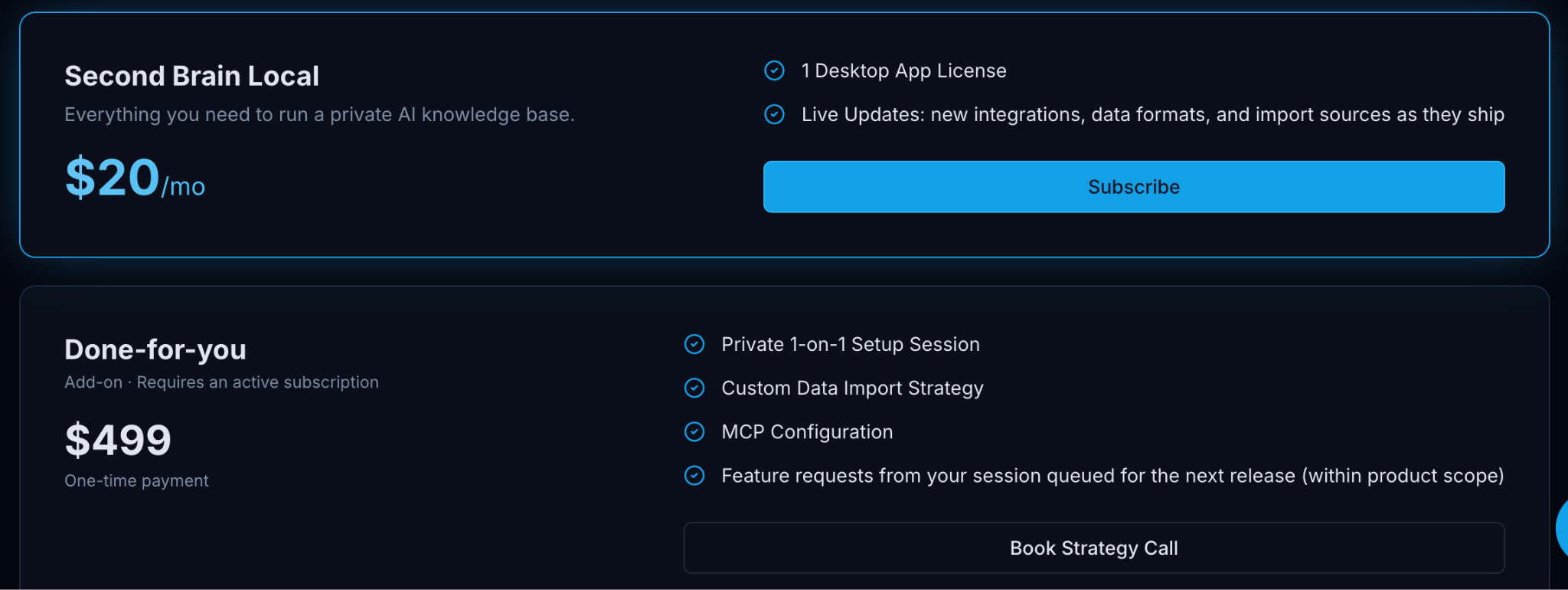
Free: 7-day trial. Paid starts at $20/month. “Done for you” option, $499.
N.B.: The “Done for you” option made me think. If I was an expert out there, what is something that given my knowledge, I could custom-curate for individual clients and that would be of very high-value to them?
Moss
Local-first Mac desktop app is a Markdown notes tool with an AI agent that writes, researches, reviews and organizes directly inside your notes.
It helps turn messy thinking, client notes, research, PRDs, drafts and decisions into private, reusable knowledge that compounds over time, without locking it in a cloud tool.
Moss is “AI inside the document,” as it can leave inline comments, suggest links between notes, read connected folders, draft or research in place, and keep every note as a plain local .md file you can open elsewhere.
Free version available. Allows for unlimited local notes.
Sublime MCP
MCP bridge allowing Sublime.app users to interrogate their curated library, or the full open Sublime library from Claude.ai and other AI agents, and to extract, find and bring together ideas, thoughts, resources and even images that connect to a specific idea or concept.
Invaluable to find rare stuff to enrich, complement or build valuable context around any topic.
*To activate it, you must go in the Settings and look for MCP.
Free also for Sublime free users (but not for much longer).
4) Give AI a Memory of Your Work
Equip your AI agents and team chat with persistent, queryable memory.
Hivemind
Beever Atlas
Hivemind
Open-source coding-agent memory tool lets Claude Code, Codex, Cursor, OpenClaw and other agents remember project history and past fixes. Like a shared brain that allows lessons, fixes, prompts, traces and working patterns not to be lost between sessions.
For expert advisors and technical consultants, its value is continuity: your best debugging paths and project decisions become searchable team knowledge and reusable agent skills. Turns repeated work into shared skills, session wiki summaries, and can search across the team’s agent history.
Still in early stages. May have installer problems, and small bugs still being ironed out. Needs Deeplake/login setup.
Free.
Beever Atlas
Open-source web app turns messy Slack, Telegram, Discord, Teams and Mattermost conversations into a live AI wiki, searchable knowledge graph, and MCP-ready memory layer for any AI assistant. Could be defined as “wiki-first RAG” as it extracts atomic facts, deduplicates them, builds topic pages, links entities, and lets AI tools query that memory through MCP.
For consultants, its value is making team expertise visible: decisions, people, projects, facts and source messages become reusable knowledge.
Free. Ver 0.1. Open-source/self-hosted; setup/admin needed.
5) Research & Classify with AI
Run deep, cited research or auto-sort content into custom categories.
Innogath
Classify Anything
Innogath
Web app + desktop app turns any big research question into cited reports, diagrams, branching pages, and notes you can reuse later.
It’s relevant to experts online as it helps turn research into a visible thinking map: clients can see sources, logic, branches, and conclusions, not just a polished AI answer.
Its best value is for people who need to defend their work: market researchers, strategists, writers, analysts, founders, and students.
Free: 500 credits/month, 2–3 deep reports. Paid starts at $9.60/mo yearly.
Classify Anything
Web app allows you to create your own AI classifier for text or images, using the exact categories and rules that matter to you.
Useful when you need to sort messy client feedback, research notes, screenshots, audits, student work, product photos, or content libraries into clear buckets without building a custom model.
Unique strength: you define the criteria, optionally add examples, upload text or images, and get structured results you can export to Excel or CSV.
Free: 1 classifier, 5 items. Paid starts at $39.90/month.
6) Curate and Vet on the Blockchain
Turn expertise or ability to gather specific data into reusable, human-verified data assets.
GeoCurator
Codatta
Geo Curator
Web app helps experts, researchers and writers to organize public knowledge into trusted, very high-quality, structured topic spaces, by curating sources, structuring arguments, linking data, and earning reputation points for useful, accurate work.
Topics to be curated are presently identified by the platform founders and early members. They are actively recruiting new curators with strong skills in research, data organization, verification and validation, database building. Recent focus topics that have been curated by the growing community include AI agent protocols, crypto datasets, health topics, the US-Iran conflict timeline, declassified UAP/UFO records, treaty organizations, and the OpenAI vs. Elon Musk case. Still in early stage but quite interesting as a pioneering platform and technology operating in this space.
Its special value is visibility through contribution: your expertise becomes part of an open, reviewable knowledge graph, while allowing anyone to focus on and curate their preferred knowledge spaces.
Free.
Codatta
Web3 framework and web / mobile app lets experts and everyday users contribute useful data, labels, videos, and domain knowledge to train AI, while keeping proof of ownership and earning rewards or royalties when that data is used. Another emerging early-stage ecosystem where individuals contribute structured expertise as blockchain-based data assets.
The topics curated seem much less interesting than similar initiatives, as they are probably driven by external partners or AI training needs that push in specific directions. Not - for now - my kind of thing, but interesting to observe how they operate, organize and structure their operations and reward mechanisms.
Free.
Paradata
Intent: Sharing the latest crop of interesting tools for experts interested in increasing their visibility, credibility and authority by finding, organizing and making sense of existing information, news and resources.
Process: Collecting interesting tools systematically, reviewing and picking most relevant ones for this compilation, vetting each one manually by visiting the site, registering, downloading, testing out basic functions and app features, writing synthetic reviews for each one, vetting reviews, grouping, ordering / sequencing, adding images, title and subtitle analysis, cover design, SEO metadata provision, test distribution, final publication.
Sources: I use many sources to find new interesting tools. They include: Betalist, Early.Tools, Yutori Scouts, Techmeme, Substack search, Curated AI Tools, Wonder Tools and many individual newsletters. Check a small subset of my key subscriptions here.
Selection Criteria:
a) Relevance to existing and upcoming curators,
b) having a free plan or very generous one,
c) presently operational,
d) emerging, not popular or well-known,
e) designed for individuals, not for the enterprise market.
I have left out Google Preferred Source, which I think is quite interesting, because I am suddenly seeing it being promoted and announced everywhere. The gist of it is that now you can tell Google through an official dedicated page, which trusted sources you’d like to be given higher priority in your Google Search results, and - more importantly - you can now ask your readers to add your publication to this set of preferences. For more info check this page.
I have also decided not to include two tiny tools (StarStar and TinyGarden) that allow users to generate public websites from specific channels on Are.na. I have not been able to test them and to find out how effective and useful they are, but the idea behind them makes a lot of sense: Curate public-facing websites, collections, feeds generated from your private personal collections. Would love to see Sublime, Glasp, Cosmos and similar ecosystems and second brains allow such publication gateways or develop them themselves.
Time: Checking and verifying which tools could qualify for inclusion: 2 hours. Reviewing all the tools: 6 hours. Organizing, structuring, sequencing: 1.5 hours. Curating images, cover and visual resources: 2 hours. Verification: 0.5 hours. Final formatting and links: 2 hours. Total time: 14 hours.
Tools: Capacities for tool capture and initial unvetted collection. ChatGPT and Claude for support in researching user reviews, comments and impressions on the tools selected. Finn Tropy | StackContacts for the analysis of all of my posts and notes. (I find it very useful to evaluate potential alternative titles, as well as to identify topic gaps, convergence among themes I have covered, weak areas and non-obvious editorial opportunities).
How It Connects To the Rest: Relevant complementary reads:


.

Cover image: Design by Robin Good - execution by ChatGPT Image 2
What I Can Do For You
I help experts and consultants who are building a new online career gain the authority, credibility, and visibility they initially lack.
I do this by teaching them how to become top trusted curators in their area of expertise.
For this purpose I’ve created a free, focused 55-minute video workshop that walks you through:
Why curated content formats are so useful for building credibility and authority
When to use them and what requirements they have
An updated list of real-world examples of curated formats at work
The specific tools you need to curate
The actual key steps that transform researching and writing into curation
The 11 typical mistakes novice curators make
One-to-One Audit & Strategic Advice
For experts and consultants looking for ways to:
a) Create Value and Build Trust for Non-Writers (Curation)
I help you identify and master your own personal ways to gain authority and value by curating insights, research, news, resources and tools in your field of interest.
b) Improve Credibility and Trust
I review your content, positioning and goals to identify the best editorial strategies to build trust and credibility around your focus.
c) Positioning and Personal Branding
I analyze your market positioning to identify key strengths and weaknesses. I help you redefine a strategy to differentiate yourself from the competition while increasing the practical value you bring to your readers.
Available in two tiers: a) for those just starting and b) for those who have been publishing for more than a year, but are not seeing results.
Follow a path with a heart.
The time is now.

From Koh Samui (TH)
Robin Good
Thank you for the mention, Robin!
Thank you Robin, appreciate the content.