

✪ The Beginner Curator's Toolstack for 2026 - #63
Author's recommended tools to find, capture, filter and showcase what really matters.

Hello, from sunny Koh Samui. In this issue I have put together an up-to-date selection of useful - albeit less popular - tools for discovering, filtering, capturing, organizing and presenting information artefacts, tools and resources. That is tools for curators. Many are free or have a free plan.
While the key curator assets are his personal experience, taste and questioning abilities, digital tools can prove to be of great assistance and complement to these essential skills.
My selection criteria favour, in many cases, the lesser known, newer kids on the block and the ones that are free or offer a generous free plan.
Thus this is not a comprehensive catalog of curation tools, but only a selection of what curation-related tools I would recommend to anyone - new to curation - asking for advice in this direction.
Suggested Curation Tools for:
1) Monitoring and Tracking News & New Content
Tools and apps to discover recent articles, essays, news and posts from the web.
For now, this is the best. Discover and subscribe to hundreds of RSS feeds, filter, search, save, annotate. Can even track web sources that have no public RSS. Offers large library of thousands of news feeds on all topics. Has integrated AI to scout, filter and highlight what you are interested into.
Free version (basically an advanced RSS feed reader).
Pricing: for Pro+ - which I recommend - almost $9/mo paid yearly.
Interesting new kids on the block:
AI agents that monitor the web for any topic (interest, product, activity).
Here a couple of personal AI research assistants I have been testing and which monitor thousands of sources 24/7 and bring you back specific information on topics you have selected. Instead of just listing headlines, these agents read and understand each article, remove fluff, and highlight only what specifically matters to you, while explaining why it’s relevant.
7-day free trial - then starts at $15/mo for 10 scouts
Free version allows up to 2 agent-curators. Follow-up to 5 agent-curators. Pro starts at $19.99 for 10 agents.
.
Also useful for news curators:
AllTop
All of the top news and information in real time on one pageAllSides
News and views from different sidesUpstract
All news sources on one-pageThe Brutalist Report
360° news scan across categoriesGroundNews + Allsides.com
Compare today’s top news headlines from multiple perspectivesTechmeme
Top daily news about technology, Silicon Valley, AI curated by humans and algos
Check also these:
📡 Content Finder Toolkit
Super-directory of 500+ plus mostly free content sources and tools to find relevant content.∎ 100% Free
Content Discovery Tools
2023 collection of 80+ places and tools where to find news, content, data.∎ 100% Free
2) Finding Interesting Stuff Beyond Google
Where I go to search and find the information I need. Alternatives-to-Google search engines.
Exa Search
AI-powered search API using embeddings for semantic understanding. Own index of 35+ billion pages. Usage-based pricing ($5-15 per 1k requests). Applications: powering AI apps, RAG pipelines, developer tools.∎ Free plan.
Marginalia Search
Swedish DIY search engine prioritizing non-commercial, text-rich “old web” content. Own index. Applications: discovering obscure blogs, personal sites, grass-fed HTML content Google ignores.∎ 100% Free
Mojeek
UK-based independent search with own crawler-based index. Zero tracking since 2006, no personalization, unbiased results. Privacy-focused general search, allows for discovery of diverse and less commercial web content.∎ 100% Free
∎ Ad-supported
Kagi
Premium ad-free search with own index plus aggregated sources. Customizable rankings, lenses, domain blocking. Ideal for personalized indie research.∎ $5-25/month (100-search trial).
Brave Search
Independent index (35+ billion pages), private by default, community-driven via Web Discovery Project. Privacy-focused search, customizable Goggles ranking.∎ Free with optional ads or premium.
New interesting kid on the block:
Parallel.ai
Search engine API built for AI agents runs deep and can create datasets from the web on any topic. Built on a proprietary web index it offers more accurate answers and lower costs for every agent. It leverages semantic objectives rather than keyword matching to capture intent, so agents can specify what they need to accomplish rather than guessing at search terms.
∎ Free $20 of usage credits
.
Check also: Alternative Search Engines
60+ tools to find faster what you are looking for.
3) Discovering New Tools
Alternatives to what ProductHunt used to do so well: discovering new apps / startups before they became famous. Here’s what I rely on mostly, among many others:
Betalist
A trusted catalog of interesting new tools, often with special perks, discount codes and offers. Available also as a newsletter.TAAFT (There’s An AI For That)
Huge directory + newsletter of all AI apps and tools. User reviewed. Big, chaotic, full of resources, but with enough patience to navigate through it, can be very useful.ScriptByAI
Directory of new AI tools full of interesting little gems.
4) Capturing and Organizing the Pearls You Find Online
Tools that make it easy to capture text passages, images, video, podcasts and more and to save it inside a personally searchable category-based archive.
Captures ideas, notes, book passages, quotes with your own annotations into user-defined categories. Designed as a "digital garden" with a super-minimalist, distraction-free interface. I like its plus AI-powered related card suggestions to connect to other ideas. Ideal for those looking for a knowledge tool that feels more like an artist's studio than a bookmarking manager or a second brain. Public (and private) collections. Brainstorming canvas. Works with Kindle, X, Instagram, Readwise, Raycast. Great founder behind it. I am a fan and use it all the time
Browser extension
Free version available
Paid - from $75/year or $400 one-time
.
Web-based highlighter, clipper and collaborative curation knowledgebase. MMakes it easy to annotate and save any web page or PDF. Kindle integration. AI-summarization. One-click export to note-taking apps like Notion, Roam Research, and Obsidian, ability to tag and search all saved content. Users can follow like-minded people. Popular among researchers, writers and lifelong learners who value building and sharing knowledge. Founded by Kazuki Nakayashiki and Kei Watanabe.
Video tutorial [05’:07”]
100% free plan. Allows unlimited public highlights/captures
Pro version starts at $12/mo allows to keep notes and highlights private.
.
15-year old trusted web-based visual platform where to archive, collect, catalog and discover gems that people find online. Focuses mostly on images, art, illustrations and ojects. Its key ability is allowing users to structure ideas over time while connecting disparate concepts, with the capacity to invite collaborators to work on specific channels privately or publicly. Fully user-supported (18K+ paying subs). I love its minimalist, distraction-free interface. Great for designers, artists, academics, who value conscious, intentional internet browsing.
Web clipper. Web, iOS, Android + browser extension.
Free version allowing up to 200 saved cards.
Pro $70/year or $7/mo
.
Visual discovery and inspiration platform where to collect, organize, and search images in a quiet digital space. AI-powered automatic tagging of every element in an image enabling powerful search. Clean interface. No notifications, likes or comments. Pinterest-alternative for creatives who want curation without algo clutter. Focus on high-quality, artistically-driven imagery. Public or private collections. Collaboration. Ideal for building mood boards and reference libraries.
Web clipper for Chrome and Safari. iOS app.
Free version available
Premium $6/mo - allows collaboration, customize grid, export, personal username.
Interesting new kids on the block:
Sunchay
Saves content intelligently and makes it searchable through natural language. One-click saving for articles, PDFs, videos, images, all automatically indexed by AI. Zero setup required, private-by-design.
Free while in BetaStacks
Replaces Google Drive, bookmarks and Notion. Features personal AI that understands intent, connects ideas across saved content, enables smart search, and organizes information automatically while browsing.
Free version available - Pro from $9/mo
Clippers Bookmark Managers
Wakelet
Capture and save any kind of content from the web, and organize it into powerful, visual collections.∎ Free plan - unlimited captures & collections
∎ Pro starts at $5.99/moeLink
Collect and save any web content. Organize it, share it and publish it through thematic collections.∎ Free plan - unlimited bookmarks
∎ Pro starts at $15/mo
.
Classical Second Brains - Information Organizers
.
Interesting new kids on the block:
GetKernel
Advanced bookmark manager with integrated AI. Let’s you save all of your favorite content while auto-tagging and connecting to other relevant stuff.Free plan available
Eden (formerly Kortex by Dan Koe)
Personal intelligent knowledgebase. Upload files, YouTube links and more to a private space where you can always find what you need, intelligently connected to the rest. Visual canvas. As if Google docs, Notion, and Obsidian had had a baby.
✅ Information Organizers Collection
40+ tools to collect, categorize, sort and organize ideas, notes, info and resources of different kinds.∎ 100% free
5) Analyzing and Extracting Insights from Video
Tools to find, capture, analyze, summarize and extract key insights from podcasts, lectures, and YT videos efficiently.
Longcut
Web app extracts key concepts from any YT video by generating key highlights with summaries. AI chat with transcripts, timestamped citations, and quick previews with auto-surfaced memorable quotes from your selected clip. I like: a) eliminated need to scrub through lengthy video, b) AI’s ability to answer specific questions with exact video timestamps, c) the polished UX.Free version allows 3 video a month
Pro starts at $9.99/mo (100 clips/mo) or buy credits
.
Free Chrome extension gets you instant AI-powered summaries and full clickable time-stamped transcripts of YT videos using AI. One-click transcript copying, multilingual support, integration with Glasp's curated knowledgebase where you can save and organize video insights alongside web and PDF highlights.
∎ 100% Free
Have been using it for a long time and like 2M+ other users, can’t recommend it more.
To find out how to best use it check this video intro by Kazuki Nakayashiki (8’:45”)
.
By far the most powerful video analyzer available today, can analyze, summarize, and extract key insights from any YT video or clip you upload to it. Can generate summary slides and professional infographics outlining the video contents, and you can actually interrogate the video as if it was a living thing. Outstanding value.
Free plan available
New interesting kids on the block:
Alternative YouTube summarizer. Super-easy to use, offers in-depth time-stamped summaries and access to full transcriptions.
∎ 100% Free
AI-native notebook designed to extract and organize knowledge from online sources including YouTube videos, PDFs, and web articles.
Free plan available
6) Finding, Enriching, Scraping Data
Tools to find, capture, organize and structure already-published online info. Basically, what these powerful tools do, is to go out on the web and while bypassing all systems protections and security barriers, automatically collect available published data online according to your own specs.
Exa Websets
Create custom massive datasets from the web on any topic and with any specific fields (name, location, size, description, features, etc.) you want.Free to try - Pro starts at $49/mo
Ottogrid
Automates manual research by leveraging AI agents that do list enrichment, research companies, or read hundreds of documents in minutes.Free plan available - Pro from $99/mo
Crosstab
Export data from any website in one click. Powerful Chrome extension allows to convert web browsing into ready-to-use custom datasets.Free plan - Pro starts at $15/mo
7) Showcasing Your Curated Collections
Alternative tools to popular platforms like Pinterest / Notion that I would consider using to visually organize, structure and showcase / present relatively small curated collections, databases, libraries. There are probably many more (please suggest in the comments) but these represent some alternative approachable starting points.
xTiles
One of my favorite apps to curate, organize and showcase curated info collections of any kind. Very powerful, easy to use. Here a good example of what you can do with it: Content Finder Toolkit.Kanban style information organizer, directory and library builder makes it easy to create text-based info directories, indexes, archives and libraries of web sites, tools, apps, articles/videos/podcasts. Among other things I use it to create a public categorized archive of my Italian podcast episodes.
Free plan allows up to 3 collections.
Trello
Same as start.me with a very generous free plan. Up to 10 collections per workspace.
8) Extra - Creating a Commercial Curated Shop
ShopMy
Offers curators a reliable monetizable platform: A digital storefront where you curate real commercial product collections. Huge inventory of quality products to select from. Affiliate commissions. 185,000+ tastemakers monetize authentic recommendations for premium brands through trust over algorithms.
N.B.: A few of the links to apps/tools in this issue provide me with a small commission if you decide to buy them. All tools are selected exclusively on the base of their usefulness in my experience using them. In most cases I have bought and actively use what I recommend.
Curation Reminder: You Don’t Need No Tools
1) Content curation is an art that requires no dedicated tools. You don’t need any specific platform or tool to do great curation.
2) Curating it’s like researching, critically analysing and presenting all bundled together.
3) Like for writing, it’s not which tool you use that makes you a great at it.
4) The key critical asset in curation is your ability to see beyond the surface of whatever you’re taking care of.
5) You can build this skill over time by systematically engaging and interacting with something you’re very interested / passionate about. It could be tools, books, people, ideas, methods, frameworks, you name it.
6) Key kills required to curate any content:
deep, insider-familiarity with the subject at hand
research, search, ability to find things
critical thinking and analysis (ability for criteria setting, vetting and filtering)
pattern recognition
synthesis
insights extraction
presentation, information design
7) There’s no tool or AI that can replace this skillset. The tools above are just additional support instruments for your curiosity, critical analysis and purposeful search for meaningful insights.
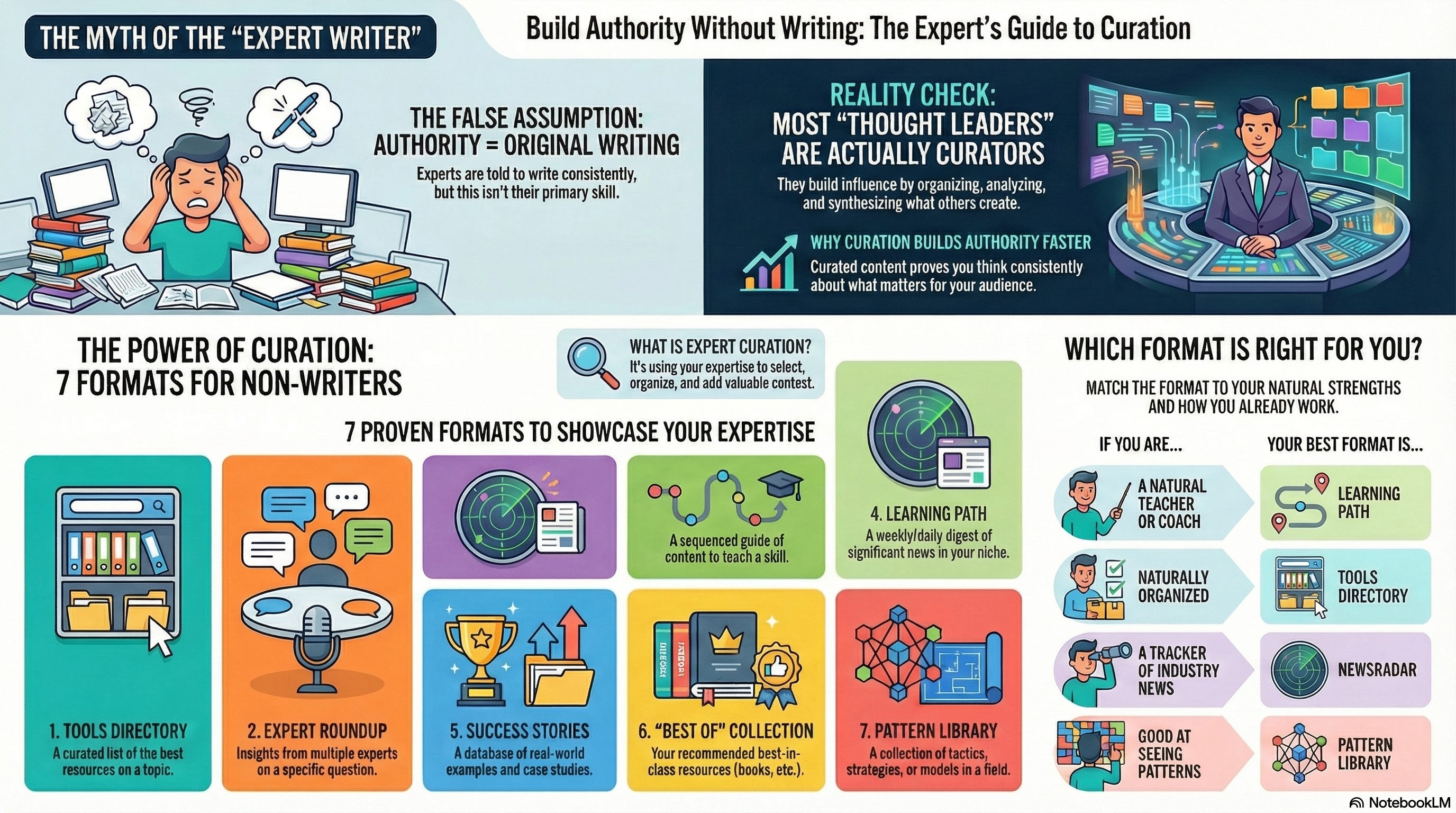
Ready To Start Building Authority Through Curation?
I’ve created a free, focused 55-minute video workshop that walks you through:
Why these curation formats are so useful
When to use them and what requirements do they have
An updated list of real-world examples
The specific tools you need
The actual key steps that transform researching and writing into curation
The 11 typical mistakes novice curators do
No fluff. No boring stuff.
The Curation-Based Authority System - Video Workshop.
Cover image: COSMOS web interface. 2026.
I have been searching and reviewing tools for communication professionals for over 20 years.
I do this because I enjoy searching, verifying and organizing.
I love to create lasting information resources that can be useful to others.
Please consider supporting this work (like, recommend, subscribe).
I’d love to keep on searching.
Follow a path with a heart.

From Koh Samui (TH)
Robin Good
Love this. Thank you! Cool idea to share your podcast recs on Start Me. I write a podcast recommendation newsletter and would love to connect.
This feels especially useful for people who are overwhelmed by choice. Clear categories, real context, and honest notes on what you actually use.